Your support on Ko-Fi is much appreciated:
Recommended RHCSA book:
📔 Amazon AU: https://amzn.to/2X5FL98
Buy CSG Merchandise:
More information on Sophos Home Antivirus:
More information about Hostinger VPS:
Join our new discord channel:
This video is based on RHEL 8. Video to cover the section ‘Configure IPv4 and IPv6 addresses’ for the RHCSA (Red Hat Certified System Administrator).
More information on the required learning: http://bit.ly/rhcsa8
Notes from the video:
This section is on IP addressing. An Internet Protocol (IP) address is an individual address for a host on a network. When using the internet your IP address is assigned to you by your Internet Service Provider (ISP).
When using the device within your home network you will be assigned a local IP address by your router and then the router uses Network Address Translation (NAT) to translate your local address to your ISP provided address for use on the internet.
There are two types of IP address in use these days IPv4 and IPv6. IPv4 is still the most widely used, but is slated to be fully replaced by IPv6, just it is a massive task.
Therefore I will cover both.
IPv4
This IP addressing scheme is a 32 bit address (being 32 1s or 0s) using decimal numbers, split into 4 octets.
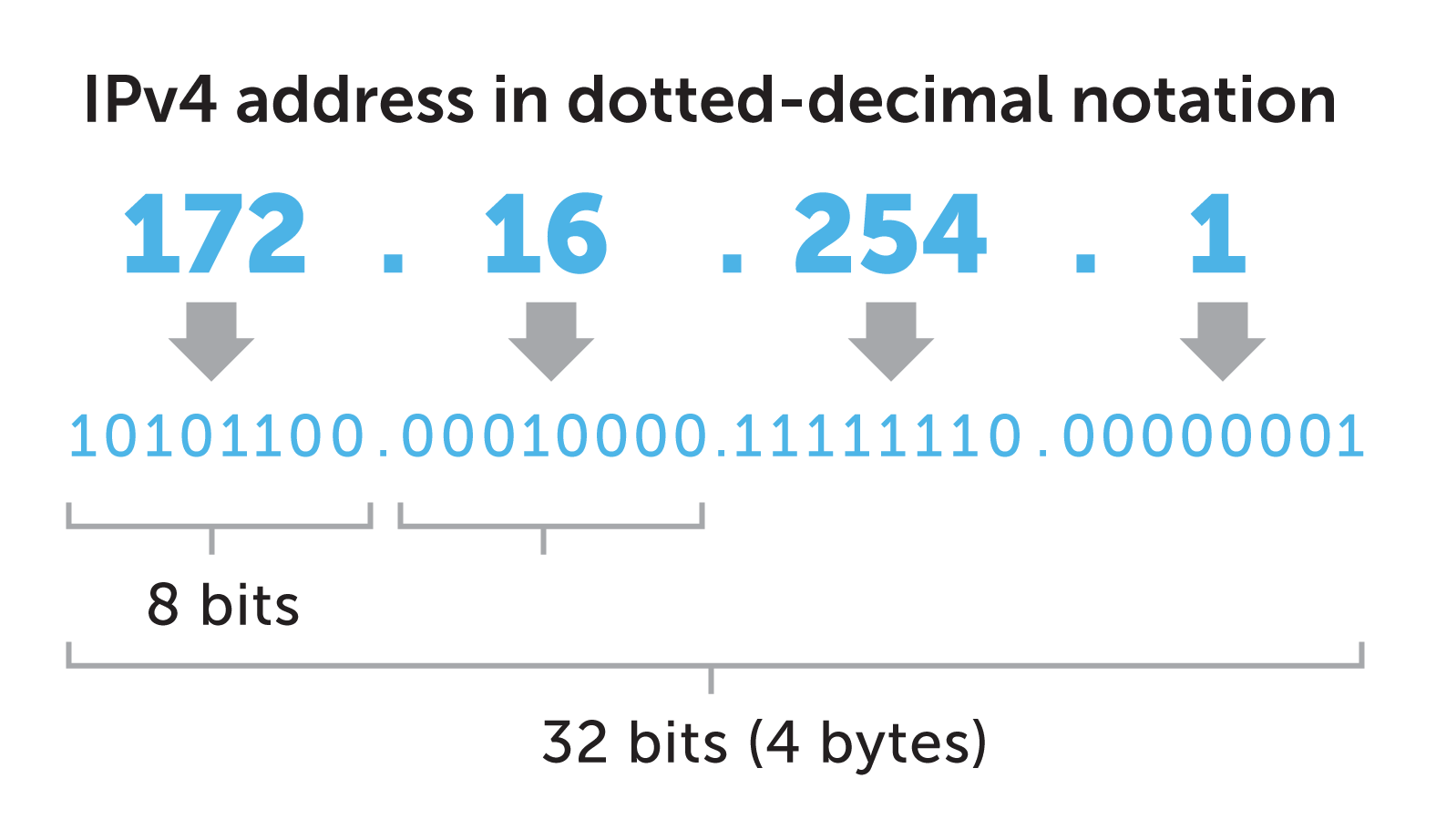
As we can see the IP address in the above example is 172.16.254.1, this is what is caused a Class B address. As the table shows below IP addresses are split into different network intents, note there is unicast (one host to one server) and multicast (one host to multiple servers).
| Class A | 1.0.0.1 to 126.255.255.254 | Supports 16 million hosts on each of 127 networks. |
| Class B | 128.1.0.1 to 191.255.255.254 | Supports 65,000 hosts on each of 16,000 networks. |
| Class C | 192.0.1.1 to 223.255.254.254 | Supports 254 hosts on each of 2 million networks. |
| Class D | 224.0.0.0 to 239.255.255.255 | Reserved for multicast groups. |
Within these classes there are ranges assigned for private use of which we have included below. The subnet mask defines how large the network is, for example the network is 10.0.0.0 and the subnet mask is 255.0.0.0, the maximum value of an IP address is 255 so for the 10. octet it is masking, all of the other octets are able to go to their maximum values. So the IP address range is: 10.0.0.0 – 10.255.255.255, we can use any address in between e.g. 10.1.4.200. The CIDR is a way of expressing the subnet mask in short form, for example we can express the below class C network as 192.168.0.0/16.
| Class | Private Networks | Subnet Mask | CIDR | Number of IP Addresses |
| A | 10.0.0.0 | 255.0.0.0 | /8 | 16,777,214 |
| B | 172.16.0.0 – 172.31.0.0 | 255.240.0.0 | /12 | 1,048,576 |
| C | 192.168.0.0 | 255.255.0.0 | /16 | 65,534 |
The good thing is once you have the hang of Subnet Masks and CIDR it is again used in IPv6 so it’s not something you will have to learn again. All networks will have a gateway address (this is a router or switch that can redirect traffic intended for other networks) and a broadcast address (this is the address we use to send messages to multiple hosts on the same network for special types of requests).
Configuring a IPv4 Address
All of the configuration is completed via the nmcli application.
To show the connection information:
# nmcli connection show
To get the current status:
# nmcli device status
To get the current configuration:
# nmcli device show
To delete a device (don’t do to your active network interface!):
# nmcli connection delete enp0s3
To add a new connection for a new device (enp0s8):
# nmcli connection add con-name eth0 ifname enp0s8 type ethernet ip4 10.0.2.16/24 gw4 10.0.2.2
To check the configuration:
# nmcli connection show
# ip addr
# nmcli device show enp0s8
To bring an interface up:
# nmcli connection up eth0
To bring an interface down:
# nmcli connection down eth0
To manually configure an IP address:
# nmcli connection modify eth0 ipv4.address 10.0.2.15/24
# nmcli connection modify eth0 ipv4.gateway 10.0.2.2
# nmcli connection modify eth0 ipv4.method manual
IPv6
The addressing used in IPv6 is 128 bit and uses hexadecimal numbers, therefore has a much larger address space. This was due to IPv4 being too small for modern needs and now pretty much all of the IPs have been used. An example IPv6 address is as below.

IPv6 addresses are classless and therefore we have no class designation, however some prefixes (same as CIDR) are reserved for specific uses. Here are some common ones.
| Prefix | Designation | IPv4 equivalent |
| ::ffff/96 Example: ::ffff:192.0.2.47 | IPv4-mapped Used to embed IPv4 addresses in an IPv6 address. One use for this is in a dual-stack transition scenario where IPv4 addresses can be mapped into an IPv6 address. See RFC 4038 for more details. | No IPv4 equivalent. However, you can search for the mapped IPv4 address in the relevant Whois Database. |
| 2000::/3 | Global Unicast The operators of networks using these addresses can be found using the RIR Whois servers listed in the IANA registry. | No equivalent single IPv4 block |
| ff00::.8 Example: ff01:0:0:0:0:0:0:2 | Multicast Used to identify multicast groups. They should only be used as destination addresses, never as source addresses. | 224.0.0.0/4 |
IPv6 uses the same gateway, but doesn’t have any broadcast address, it’s as the protocol is more modern and no longer needs this functionaility.
Configuring an IPv6 Address
Using the same method as above to manage the connection, the only difference is when you come to configure the actual IP addressing.
To add a new connection for a new device (enp0s8):
# nmcli connection add con-name eth0 ifname enp0s8 type ethernet ip6 2006:ac81::1105/64 gw6 2006:ac81::1101
To manually configure an IP address:
# nmcli connection modify eth0 ipv6.addresses 2006:ac81::1105/64
# nmcli connection modify eth0 ipv6.gateway 2006:ac81::1101
# nmcli connection modify eth0 ipv6.method manual
 Computers, Security & Gadgets